
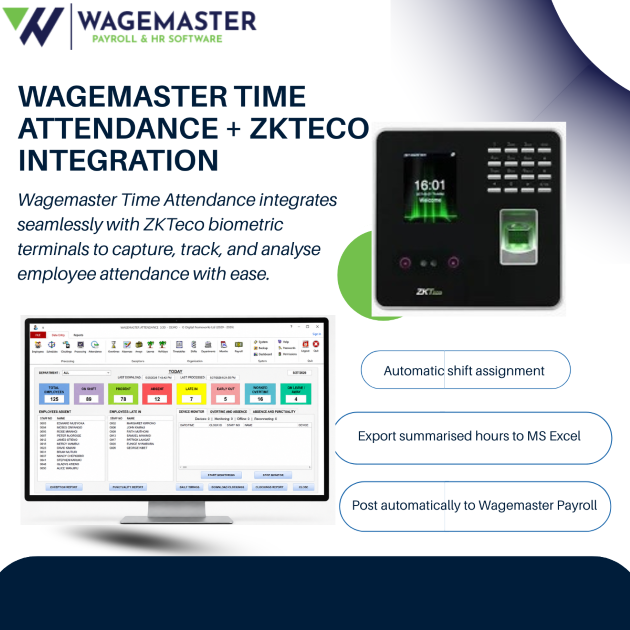
Wagemaster Time and Attendance Software works with a wide range of ZKTeco attendance terminals, allowing businesses to capture employee attendance information and process it within a structured time and attendance system. Depending on the ZKTeco device, employees can clock in using fingerprint, facial recognition, RFID cards or a password.
The attendance information can then be brought into Wagemaster for processing and analysis, with summarised working hours posted to Wagemaster Payroll or exported for use with another payroll or HR system.
This article looks at how Wagemaster Time and Attendance Software in Kenya with ZKTeco Integration helps businesses capture employee attendance, manage working hours and connect attendance data to payroll.
THE CORE PROBLEM: WHY MANUAL ATTENDANCE BREAKS PAYROLL
Let’s be real. When attendance is recorded manually in registers, spreadsheets, or notebooks, keeping payroll accurate can quickly become a challenge.
Here’s why:
Manual registers create errors. Someone writes “21 days” when it was 20. Someone forgets to note the late arrivals. The handwriting is unclear. The data is inconsistent across branches. By month-end, you’re not sure which version is correct.
Buddy punching drains money. One employee clocks in for another. The payroll system pays for hours nobody worked. Over a year, this adds up—KES 50,000, KES 100,000, sometimes more depending on your team size. It’s also demoralizing for honest employees who watch others get paid for not working.
Ghost workers appear on payroll. Someone isn’t actually showing up, but the attendance record says they are. It happens more often than you’d think, especially if there’s no biometric verification. By the time you catch it, you’ve overpaid significantly.
Salary processing gets delayed. HR spends days manually entering attendance into the payroll system. Then managers request corrections. Then HR re-enters data. Then discrepancies are discovered. Payroll that should take a day takes a week. Employees wait. Frustration builds.
Disputes multiply. “I was here that day, I don’t know why it says I wasn’t.” “I clocked in at 8:05, not 8:30.” “That overtime wasn’t approved.” Without digital proof, there’s no way to settle these quickly. HR becomes referee instead of strategist.
Compliance becomes risky. If you’re audited by KRA or during an NSSF inspection, your manual attendance records probably won’t hold up. What happens if you can’t prove you paid correctly? What if someone claims you underpaid and you have no evidence to defend yourself?
Data integrity fails. A spreadsheet gets corrupted. Someone accidentally deletes a row. A file doesn’t save. Now you’re recreating attendance records from memory, and nobody remembers correctly.
The solution isn’t just buying a biometric device and calling it done. The solution is connecting that device to payroll software that actually uses the data.
That’s where Wagemaster comes in.
WHAT IS WAGEMASTER TIME AND ATTENDANCE SOFTWARE?
Wagemaster Time and Attendance software is a standalone software module designed to do one thing really well: capture, manage, and report on employee attendance from biometric devices.
Here’s the distinction: ZKTeco provides the hardware (the fingerprint scanner, the facial recognition device). Wagemaster provides the software that makes sense of that data and connects it to payroll.
Key points about Wagemaster:
It’s standalone. You can buy it separately from Wagemaster Payroll (though they work beautifully together). If you’re using different payroll software, Wagemaster Attendance exports to Excel so your existing payroll system can import it.
It uses a one-off purchase model—KES 52,200. No monthly fees. No recurring payments. You buy it once, and it’s yours. This is a huge advantage for small and medium businesses tired of subscription software nickel-and-diming them every month.
It’s designed for Kenyan businesses, which means it understands Kenyan payroll complexity: PAYE deductions, NSSF contributions, SHIF, Housing Levy, casual employees, weekly payroll, multiple branches. The software is built for Kenya’s reality, not adjusted from an international product that doesn’t understand local requirements.
What it actually does:
- Accepts biometric data from ZKTeco devices (fingerprint, face recognition, RFID, password)
- Calculates daily hours, late arrivals, absences, overtime
- Handles multiple shifts, rotations, and timetables
- Tracks exceptions (meetings, leave, holidays)
- Supports overnight shifts and 24-hour rotations
- Generates detailed attendance reports
- Posts attendance data automatically to Wagemaster Payroll (or exports to Excel)
- Supports unlimited employees and up to 255 connected devices
- Manages multiple locations with centralized control
WHAT IS ZKTECO AND HOW DOES IT WORK?
ZKTeco is a global manufacturer of biometric verification technology. If you’ve seen a fingerprint scanner or facial recognition device at an office entrance in Kenya, it was probably ZKTeco.
The company dominates the East African market because their devices are reliable, affordable, and actually work in Kenya’s conditions (dust, humidity, power fluctuations—they handle all of it).
How a ZKTeco device works:
An employee approaches the device. They place their finger on the scanner, or look at the camera, or tap their card, or enter a PIN—whatever authentication method your device uses.
The device captures the biometric data (fingerprint or face), compares it to enrolled templates (the reference data it has on file), and if it matches, it records a timestamp: 08:32 AM, John Mwangi, Clock In.
That’s it. That single action is stored in the device’s memory.
Throughout the day, dozens or hundreds of employees use the same device. Each one creates a record. By end of day, the device has a complete log of everyone who showed up and when.
ZKTeco devices available:
| Model | Type | Capacity | Price Range (KES) |
|---|---|---|---|
| K40 | Fingerprint (basic, reliable) | 1,000 fingerprints, 80,000 records | 12,000–24,000 |
| F18 | Fingerprint (standalone or networked) | 3,000 fingerprints, 30,000 records | 12,000–33,000 |
| MB20 | Multi-biometric (compact) | Fingerprint + card | 27,700 |
| MB360 | Fingerprint + face recognition | 1,500 fingerprints, 100,000 records | 39,900 |
| F21 | Fingerprint (compact) | Varies | 42,000 |
| F22 | Fingerprint (advanced) | Varies | 39,900 |
| TF1700 | Fingerprint (network-capable) | Varies | 39,900 |
| SpeedFace-V3L | Facial recognition (fast, contactless) | 1,200 faces | 49,900 |
| SpeedFace-V5L | Facial recognition (advanced) | Higher capacity | 84,900 |
| S922 | Multi-biometric (enterprise) | 50,000+ templates | 120,000+ |
| Horus E1 | Mobile biometric (fingerprint/face) | Field teams, remote sites | 66,800–6 |
Wagemaster Time and Attendance Software works alongside ZKTeco devices to turn raw attendance records into useful working-hour information for HR and payroll teams.
HOW ZKTECO INTEGRATION WITH WAGEMASTER WORKS: STEP-BY-STEP WORKFLOW
The workflow is straightforward, but understanding each step is important—especially if you’re planning to set one up.
Step 1: Employee Clocks In at the ZKTeco Device
Your ZKTeco terminal sits at the entrance or on a wall. Every morning, employees clock in. Every afternoon, they clock out.
Behind the scenes, the ZKTeco device stores this data. A single K40 can store 80,000 attendance records. Multiple devices can work simultaneously, each keeping its own records. If you have five branches, each branch can have its own device, and Wagemaster consolidates all the data.
The employee doesn’t need to understand how it works. They just place their finger, or smile at the camera, and the device beeps or flashes. They know they’re clocked in.
Why this matters: The biometric data is locked in. It can’t be changed, forged, or disputed. The system has proof that John was here at 08:32 because his fingerprint (or face, or card ID) matched the enrollment template at exactly that time. No write-out, no excuse, no ambiguity.
Step 2: Attendance Data Downloads to Wagemaster
At a time you choose (end of shift, end of day, weekly, or whenever), someone downloads the attendance data from the ZKTeco device(s) into Wagemaster Time and Attendance Software.
You have multiple download options:
- Ethernet cable (direct network connection, fastest, real-time possible)
- WiFi (if your device supports it, convenient)
- USB flash drive (manual transfer, works offline, good for remote sites)
- Internet (for remote branches with DDNS or static IP, enables centralized monitoring)
Most businesses download weekly or at month-end. Some choose daily downloads to catch issues early (unexpected absences, unusual overtime patterns, device malfunctions).
The process is simple: Open Wagemaster, select your device, click “Download,” and wait 30 seconds to 2 minutes depending on device and data volume. The software handles the rest.
Why this matters: The data leaves the device and enters Wagemaster, where it can be analyzed, cross-checked, and prepared for payroll. The device is just a recorder; Wagemaster is the analyzer.
Step 3: Wagemaster Analyzes and Calculates Hours
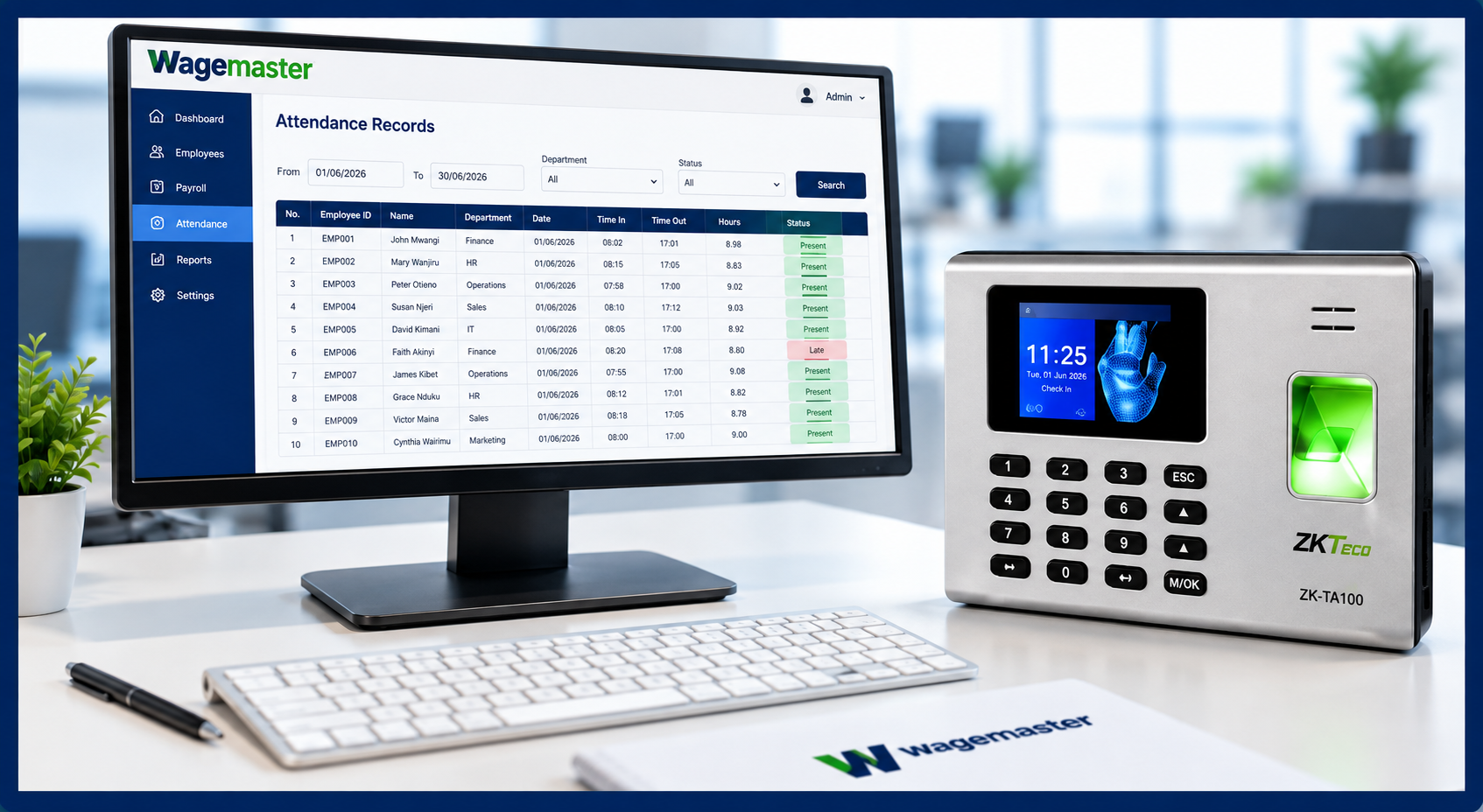
Once the data is in Wagemaster Time and Attendance Software, the system applies your organization’s shift rules and calculates working hours, late arrivals, absences and overtime.
Daily hours worked: Clock out time minus clock in time, minus break time if configured. If someone clocked in at 8:00 AM and clocked out at 5:00 PM with a 1-hour lunch, Wagemaster calculates 8 hours.
Late arrivals: If someone clocked in at 8:45 AM and shift starts at 8:00 AM, they’re 45 minutes late. Wagemaster flags this and can auto-deduct late penalties if your policy requires it.
Absences: If someone didn’t show up, Wagemaster flags it as absent. If they used annual leave or sick leave, that’s noted separately.
Overtime hours: Any time beyond standard daily hours. If shift is 8 hours and someone worked 10, that’s 2 hours overtime. Wagemaster tracks this separately so payroll can apply overtime rates (usually 1.5x or 2x base pay).
Meeting/leave/holiday exceptions: Days when attendance rules change. If someone attended a work meeting all day and didn’t work at their post, you can mark that day with an exception. If it’s a public holiday, Wagemaster handles that differently from a regular working day.
Hours by location: If you have multiple branches, Wagemaster tracks each location’s attendance separately, then can consolidate for payroll or report by branch.
If you have overnight shift workers, Wagemaster calculates correctly—not splitting midnight into two days, but recognizing 10 PM–6 AM as a single 8-hour shift.
If you have flexible shifts, you set up custom timetables so Wagemaster knows what “on time” means for each shift. A restaurant afternoon shift might be 1 PM–9 PM. A factory night shift might be 10 PM–6 AM. Each has its own timetable.
Wagemaster then generates reports showing all of this: how many days each person worked, how many hours of overtime, how many absences, how many late arrivals. This data is ready for payroll.
Why this matters: Attendance data becomes actionable payroll data. The software doesn’t just record when people showed up; it calculates what they’re owed.
WHAT ATTENDANCE INFORMATION CAN WAGEMASTER MANAGE?
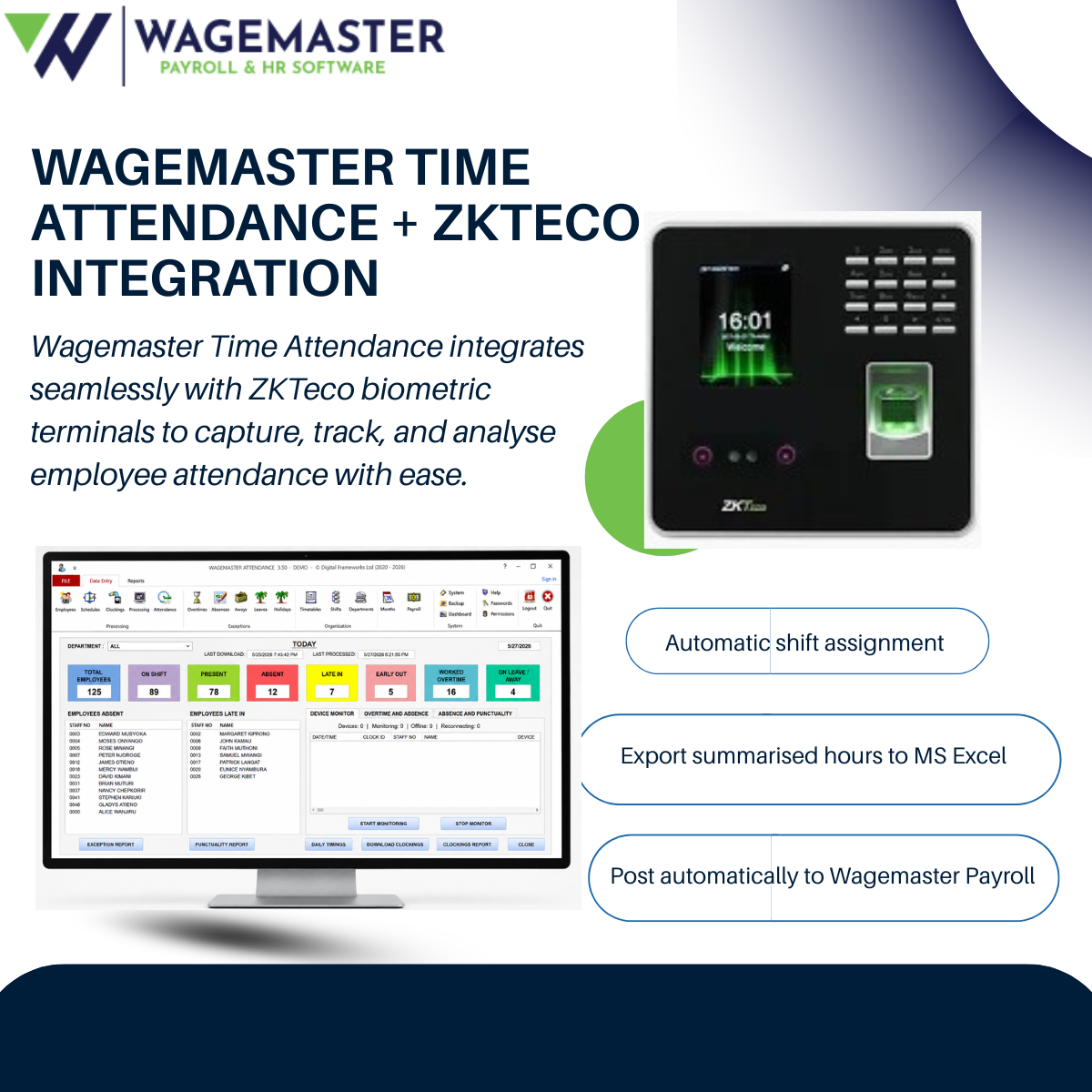
Wagemaster Time and Attendance Software tracks comprehensive attendance data across employees, departments and branches.
Daily hours worked: Precise hour-by-hour calculation for each employee each day. Useful for hourly-rate employees, casual workers, and anyone with flexible schedules.
Late arrivals: Records exactly how many minutes late, which employee, which day. Useful for identifying patterns (someone habitually late) or one-off issues (traffic jam).
Absences: Identifies when an employee didn’t show up. Distinguishes between unexcused absences (no-show) and excused absences (approved leave, sick leave).
Overtime hours: Tracks hours worked beyond standard shift length. Automatically calculates overtime pay at your specified rate (1.5x, 2x, etc.).
Meeting/leave/holiday exceptions: Special days when attendance rules change. An employee attends an all-day training—that’s not “worked hours” in the traditional sense, but it’s an exception worth tracking. A public holiday—different from a regular working day.
Project allocation: If configured, tracks which project or cost center an employee worked on during certain hours. Useful for project-based billing or cost tracking.
Shift tracking: Records which shift each employee worked (morning, afternoon, night). Important for shift-based businesses where different shifts have different pay rates.
Employee-level reporting: Generate reports per employee showing their complete attendance picture for a month, a quarter, a year. See patterns.
Department-level reporting: Summarize attendance by department. Which department has the most absences? The most overtime? Data-driven insights.
Branch-level reporting: For multi-location businesses, see attendance trends per branch. Compare performance across locations.
Time-based trends: Identify patterns. Is Monday the day most people are absent? Do certain days of the week have consistent overtime? Are there seasonal patterns?
All of this data flows into your payroll system, ensuring salaries are calculated based on verified, detailed information—not guesses.
MANAGING SHIFTS, TIMETABLES, AND OVERNIGHT WORK
One of the strongest features of Wagemaster Time and Attendance Software is its flexibility for businesses with different shifts and work schedules.. Kenyan businesses don’t all work 8 AM–5 PM. Here’s how Wagemaster handles real-world shift complexity.
Basic shift setup:
You define your shifts. A restaurant might have:
- Morning shift: 8 AM–2 PM (6 hours)
- Afternoon shift: 2 PM–8 PM (6 hours)
- Evening shift: 7 PM–close (variable, often 10–12 hours)
Wagemaster knows these times. When an employee clocks in at 8:15 AM and clocks out at 2:30 PM, Wagemaster calculates their hours against the morning shift template. It knows they worked 6 hours 15 minutes when they should have worked 6 hours, so 15 minutes late departure. Or 15 minutes overtime, depending on your policy.
Overnight shifts:
Manufacturing, healthcare, hospitality, security—these industries run 24 hours. A night shift worker clocks in at 10 PM and clocks out at 6 AM. That’s 8 hours.
Without proper software, this creates problems. Did they work Sunday 10 PM–Monday 6 AM? Or Monday 10 PM–Tuesday 6 AM? It matters for payroll calculation.
Wagemaster handles this correctly. You define the shift as overnight, and the software knows not to split it across two calendar days. It’s one 8-hour shift, recorded properly.
Shift rotations:
Many businesses rotate staff through different shifts. One week morning, next week afternoon, then night, then back to morning.
Wagemaster supports this. You can manually assign shifts, or use automatic shift assignment to rotate employees through shifts. The software tracks which shift each person worked each day and calculates hours accordingly.
Multiple timetables:
Different business units might have different shift patterns. A factory might run 8 AM–5 PM for office staff and 24-hour rotating shifts for production. A hotel has housekeeping (fixed day shift), front desk (rotating shifts), and management (flexible).
Wagemaster allows multiple timetables. Each employee gets assigned to the timetable that matches their role. When they clock in, the software applies their timetable’s rules.
Flexible schedules:
Some businesses don’t have fixed shifts. Employees work whatever hours they want, as long as they hit their weekly target. Wagemaster supports this too.
You define a “flexible shift” (no set start/end time), and Wagemaster tracks total hours worked. As long as someone hits 40 hours in a week, they’re good. If they work 35, they’re short 5 hours.
Automatic shift assignment:
If you have a large team and rotating shifts, manually assigning everyone every week is tedious. Wagemaster can automate this. You set up the rotation pattern (Week 1: Morning, Week 2: Afternoon, Week 3: Night, repeat), and Wagemaster automatically assigns each employee to the correct shift each week.
Connecting Attendance Data to Payroll
Wagemaster Time and Attendance Software creates a structured connection between employee attendance records and payroll processing, reducing the need for repetitive manual data entry.
This is where the value becomes obvious. When attendance and payroll work together, there is less need to manually transfer attendance information from one process to another.
Why does automatic posting matter?
When attendance is handled manually, every additional step creates another opportunity for incorrect or missing information. Connecting attendance with payroll creates a more structured flow of data.
The Connected Workflow
→
Wagemaster Attendance
→
Working Hours
→
Wagemaster Payroll
The key difference: your ZKTeco device captures the attendance, while Wagemaster gives that attendance information a place within the wider payroll process.
